← All alternatives
SalesSign vs Dropbox Sign · 2026 comparison

The Dropbox Sign alternative built for Salesforce teams

Dropbox Sign (formerly HelloSign) is simple, well priced signing for documents you already have. If your reps build proposals and quotes from Salesforce, it is only half the job: there is no builder, templates have to be created and kept in Salesforce through a single connected user, and you learn nothing about how the buyer read the document. SalesSign puts the proposal builder, eSignatures, engagement analytics and a native Salesforce integration in every plan, from £19 per user per month.

Proposal builder included Salesforce included on every plan Engagement analytics 14-day free trial
SalesSign
VS
Dropbox Sign

Clean, affordable eSignatures. No proposal builder, Salesforce-only templates behind one connected user, and status-only tracking.

The short answer

Which one should a Salesforce team choose?

Choose SalesSign if your reps create the documents they send, sell from Salesforce, and want the proposal, the signature and the engagement data on the Opportunity in one product. Every plan includes the builder, eSignatures, analytics and the native Salesforce integration.

Stay with Dropbox Sign if you only need signatures on finished documents, your volume is modest, and price is the deciding factor. For pure signing, Dropbox Sign’s Standard plan is cheaper than SalesSign, and if your team already lives in Dropbox it fits naturally. Be honest with yourself about whether a second tool is building the documents.

Why customers switch

Why Salesforce teams choose SalesSign over Dropbox Sign.

Build proposals, not just sign documents

Dropbox Sign signs a file you upload or generate elsewhere. SalesSign’s drag-and-drop builder creates the proposal from the Opportunity, with pricing tables fed by Opportunity Products or CPQ lines, merge fields that keep their formatting, and locked sections that protect legal copy and pricing.

Templates that belong to the team

Dropbox Sign for Salesforce runs through one connected admin user, templates must be created and maintained in Salesforce, and editing them in the Dropbox Sign app can corrupt them. SalesSign templates are versioned, shared across the account and edited anywhere, and each user signs in with Salesforce. See how the Dropbox Sign integration works.

Know what the buyer did

Dropbox Sign reports request status: sent, viewed, signed. SalesSign records who read which page, for how long and where they stopped, with session replay, and writes it to the Salesforce record so reps follow up on the deals that are live.

Feature by feature

SalesSign vs Dropbox Sign: side by side.

Where each feature sits in the two products, including which Dropbox Sign plan you need to get it.

Feature
SalesSign
Dropbox Sign
Drag-and-drop proposal and document builder
Every plan; document, deck and responsive web modes
Not included
eSignatures with sequential and parallel routing
Every plan
Every plan; unlimited requests on paid plans
Templates
Unlimited, version-controlled, shared by the account, edited anywhere
Limited by plan; for Salesforce, created and maintained in Salesforce only
Salesforce integration
Native and included on every plan; builder opens inside Salesforce
Standard plan and above; managed package with one connected admin user
Field placement
Visual placement or PDF overlay, no tags to maintain
Editor placement or one-line text tags with fixed height
Merge fields
Any object, lookups five levels deep, related lists into tables
Eligible fields on the source object; writeback fields
Engagement analytics
Page-level time, per-recipient engagement, session replay, every plan
Request status only
Custom branding
Every plan
Higher paid tiers
Bulk send and reminders
Automatic reminders; Salesforce Flow actions to send at scale
Reminders included; bulk send on higher tiers
Collect payment at signature
Stripe Sign & Pay on the Max plan
Not offered
Mobile
Buyers sign on any device; reps build and send from Salesforce mobile
Signing on any device; template creation and sending from Salesforce not supported on tablets or phones
Single sign-on
Sign in with Salesforce, every plan
Premium
API
Salesforce Flow actions and Zapier, every plan
Separate API plans; embedded signing from $300 a month
Pricing
£19, £29 or £49 per user per month, billed monthly
Essentials $15 a month for one user; Standard $25 per user per month, two-user minimum; Premium on quote
Try before you buy
14-day trial with 5 signing envelopes
Free plan for occasional signing; 30-day Salesforce trial

Dropbox Sign plan details taken from sign.dropbox.com and help.dropbox.com on 10 September 2026. Dropbox Sign prices are in US dollars, SalesSign in pounds sterling. Always check the latest with the vendor.

Pricing compared

What a Salesforce team actually pays.

Take a ten-person sales team that builds proposals from Salesforce and needs them signed. Dropbox Sign is the cheaper signature tool; the question is what it costs once the documents have to come from somewhere.

Dropbox Sign

Standard

$25 per user / month, two-user minimum
  • Unlimited signature requests and the Salesforce integration
  • No proposal builder: documents come from another tool or a static PDF
  • Status tracking only; no engagement analytics
  • API and embedded signing sold separately
Ten users, one year$3,000 for signatures, plus whatever builds the documents
SalesSign

Pro

£29 per user / month, billed monthly
  • Proposal builder, eSignatures, analytics and Salesforce included
  • 20 signing envelopes per user each month, top up as you go
  • AI Studio builder assistant
  • No annual contract
Ten users, one year£3,480, documents and signatures in one
SalesSign

Max

£49 per user / month, billed monthly
  • Everything in Pro
  • 50 signing envelopes per user each month
  • Stripe payments at acceptance
  • Forms mapped to Salesforce fields
Ten users, one year£5,880, all features included
If your team already has a proposal or CPQ tool it is happy with and only needs signatures, Dropbox Sign Standard is the lower-cost option and we will say so. SalesSign’s case is replacing the proposal tool, the signature tool and the analytics with one product on the Salesforce record. Teams that only need the builder and pay-as-you-go signing can start on SalesSign Builder at £19 per user per month.
How SalesSign compares

A closer look at the Dropbox Sign alternative for Salesforce.

Builder

A proposal experience, not a PDF upload

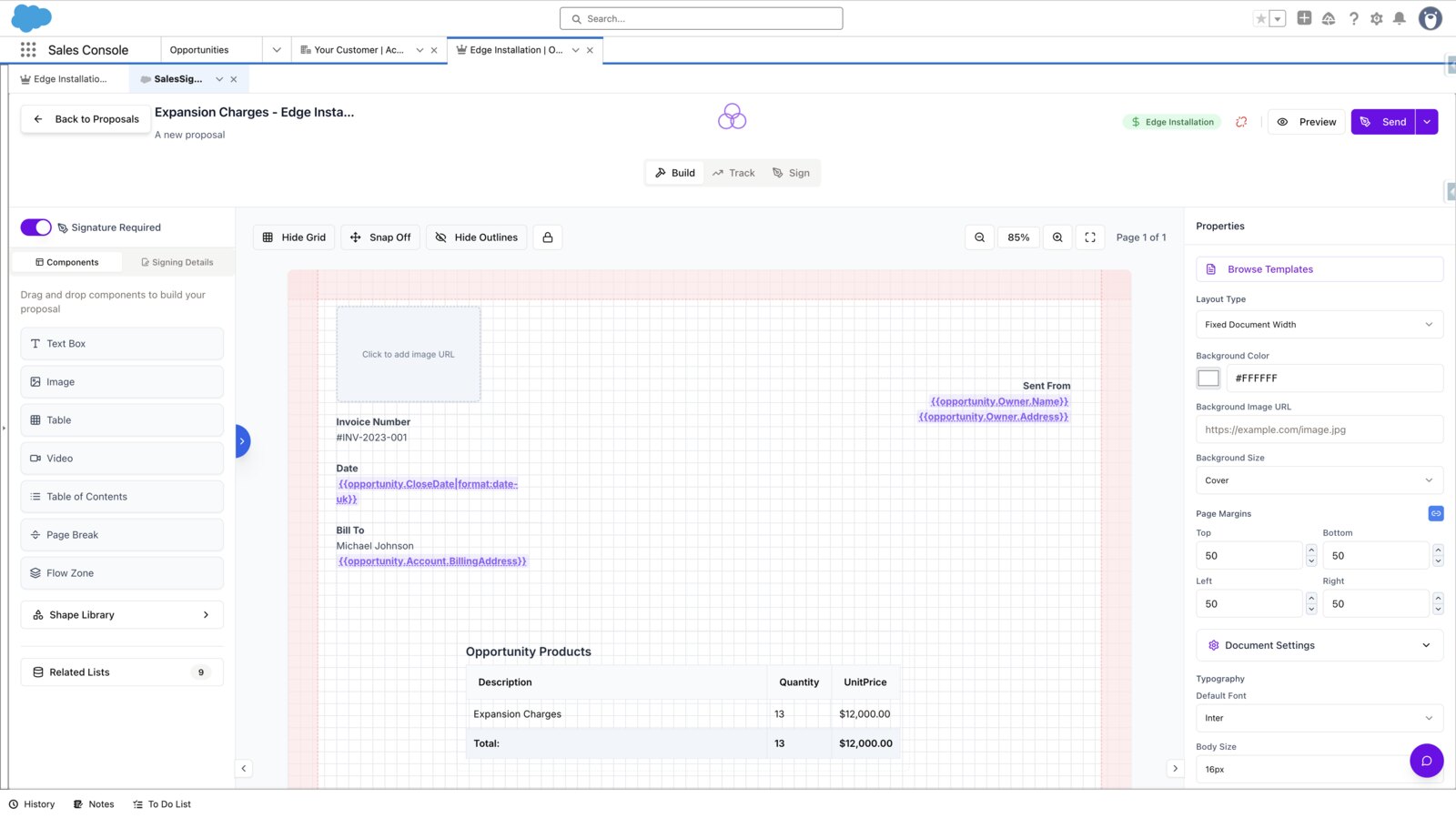
Reps build interactive proposals from reusable blocks inside Salesforce, with Opportunity Products or CPQ lines in the pricing table and merge fields drawn from any related object. Buyers open a branded, responsive document on any device and sign in the same flow. Fixed contracts can still be uploaded as PDFs with fields placed visually.

SalesSign proposal builder open inside the Salesforce console on an Opportunity record
Templates

No connected-user bottleneck, no re-tagging

Dropbox Sign for Salesforce ties every template and open request to one connected admin, and Dropbox warns that changing that user breaks open requests and hides templates. SalesSign templates are versioned and shared across the account, locked sections control what reps can edit, and there are no text tags to re-place when a layout changes.

SalesSign template lock settings controlling which sections reps can edit
Engagement

Know what’s working before you follow up

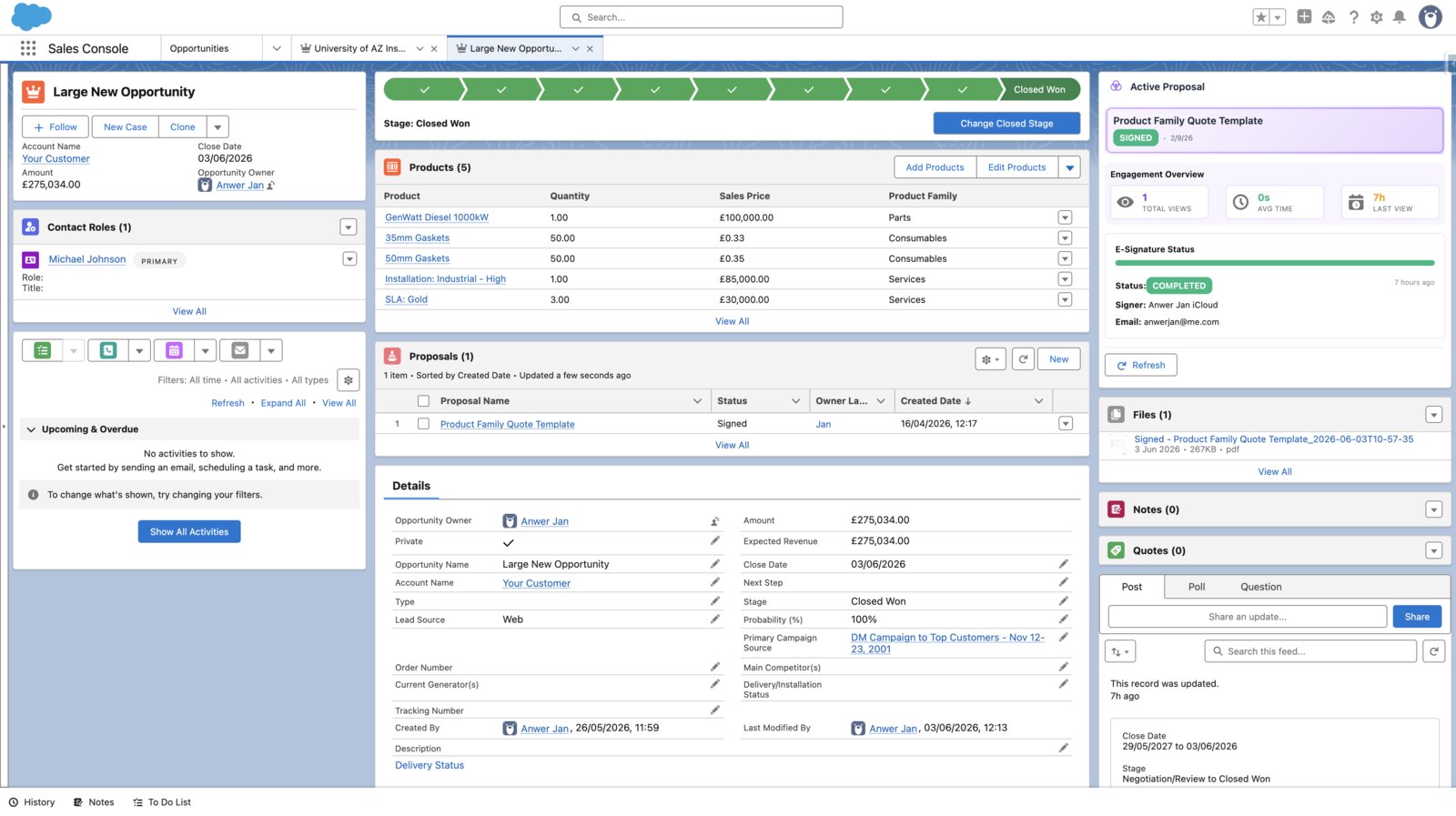
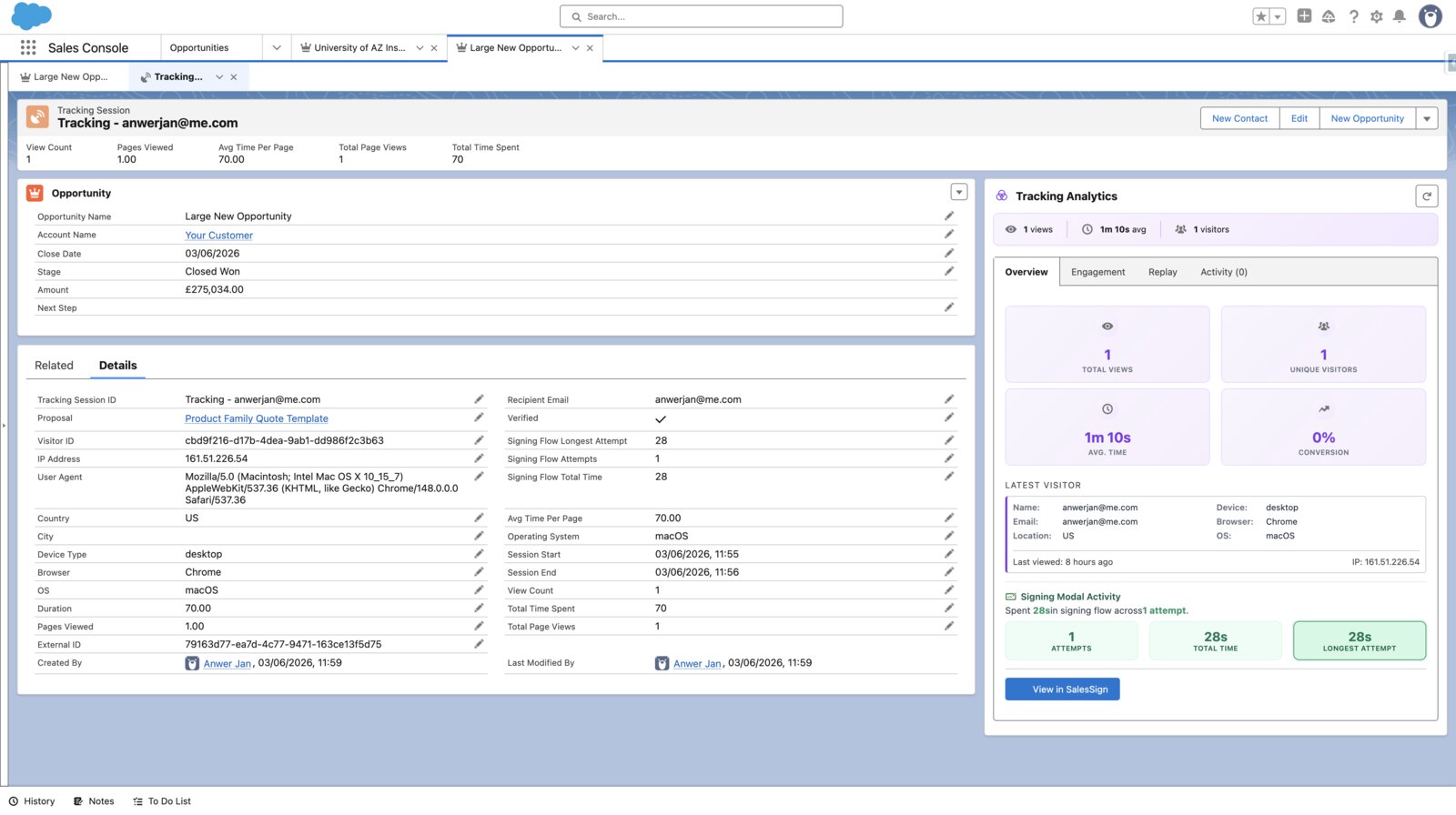
Every view, every page, every minute is recorded per recipient and written to the Salesforce record, with session replay when you want to see exactly where a buyer paused. Signed PDFs and the full audit trail land on the record automatically. It is included on every plan.

SalesSign per-recipient engagement view showing time spent on each page of a proposal
Switching

How to move from Dropbox Sign to SalesSign in six steps.

Most teams keep Dropbox Sign for requests already out for signature, send everything new from SalesSign for one sales cycle, then switch off at renewal.

Check your Dropbox Sign renewal

Standard and Premium are billed annually. Note the renewal date and plan the switch to land before it.

List the templates that matter

Open the Dropbox Sign Templates tab in Salesforce and list the templates sent in the last 90 days, with the merge and writeback fields each uses. Most teams find five to ten do nearly all the work.

Rebuild proposals, overlay contracts

Proposals and quotes are rebuilt natively in the builder with pricing tables and merge fields. Contracts that cannot change are uploaded as PDFs with signature fields placed visually, so text tags are no longer needed.

Connect Salesforce

Install the SalesSign package, authorise the connection and map merge fields to the Opportunity, Account, Contact, Quote and custom objects. Users sign in with Salesforce, so there is no connected-user setup and nothing to re-provision when people change roles.

Run a pilot for one sales cycle

Start with the 14-day free trial and its five envelopes, then move a pilot team onto Pro or Max. Keep Dropbox Sign for requests already in flight.

Archive and switch off

Completed Dropbox Sign requests sent from Salesforce are already on the Signature Request records. Download any others, attach them to the relevant records, and cancel before renewal.

Onboarding help is included on every SalesSign plan. If you would like us to rebuild your top templates with you, mention it when you book a demo.
Other comparisons

Comparing Dropbox Sign with PandaDoc, DocuSign or SignNow?

If Dropbox Sign is on your shortlist, these usually are too. For the full field, see our guide to the best PandaDoc alternatives for Salesforce teams.

Dropbox Sign vs PandaDoc

PandaDoc adds the proposal builder and content library Dropbox Sign lacks, at a higher price, with Salesforce sold as an add-on on annual Business and Enterprise plans. See how SalesSign compares with PandaDoc.

Dropbox Sign vs DocuSign

DocuSign is the enterprise standard with a deeper Salesforce app, yearly envelope allowances and a higher price; Dropbox Sign is simpler and cheaper. Neither builds the document. See how SalesSign compares with DocuSign.

Dropbox Sign vs SignNow

SignNow is cheaper still for pure signing, but its Salesforce integration and API sit on the Enterprise tier or a usage-priced Site License. See how SalesSign compares with SignNow.

Customer Story
“From an engineering standpoint, the live Salesforce data sync is the feature that sold it — no stale fields, no manual updates, proposals always reflect the current record. The behavioural analytics go deeper than a simple open notification: scroll depth, session replays and triggered follow-ups based on what the prospect actually read.”
Levente Nagy
Lead AI Engineer, Ipsotek Ltd
FAQ

Dropbox Sign alternative questions, answered.

Is SalesSign a good Dropbox Sign alternative for Salesforce?

Yes, for sales teams that build the documents they send. SalesSign covers eSignatures with sequential and parallel routing and a full audit trail, and adds the proposal builder, engagement analytics and a native Salesforce integration that Dropbox Sign does not have. If you only need to sign finished documents at low cost, Dropbox Sign remains a good choice.

Is SalesSign more expensive than Dropbox Sign?

For signatures alone, yes: Dropbox Sign Standard is $25 per user per month against SalesSign Pro at £29. The difference is what is included. SalesSign Pro adds the proposal builder, engagement analytics and the native Salesforce integration, so for teams currently paying for a separate document tool the total is usually lower with SalesSign.

Can I use Dropbox Sign templates and text tags inside Salesforce?

Yes, but with conditions: templates must be created and maintained in Salesforce (templates from the Dropbox Sign app or API cannot be used there), everything runs through one connected admin user, and text tags must be one line with a fixed height. Our Dropbox Sign Salesforce integration guide covers the requirements and limits. SalesSign templates are built once, versioned, shared by the account and placed visually, so nothing is re-tagged.

Can SalesSign handle non-sales eSignatures such as HR or legal?

Yes. Any document that needs a signature can be uploaded as a PDF, fields placed visually and sent for sequential or parallel signing with a full audit trail. SalesSign is built for sales teams first, so a business that mostly signs HR paperwork outside a CRM may still find Dropbox Sign the simpler fit.

Will the audit trail satisfy our compliance team?

Yes. SalesSign produces a tamper-evident audit trail with signer identity, IP address and timestamps, and a signed PDF that meets eIDAS in the UK and EU and ESIGN and UETA in the US. The trail is stored on the Salesforce record alongside the signed document.

How long does onboarding take?

Connecting Salesforce takes minutes. Most teams rebuild their top templates in a few hours and run a pilot within the first week. Onboarding help is included on every plan.

Does SalesSign work with Dropbox?

Not as a storage integration. SalesSign stores templates, media and signed PDFs in its own UK/EU-hosted library and on the Salesforce record. Teams that need signed documents in Dropbox can download them or automate the copy with Zapier.

Does SalesSign have a free plan like Dropbox Sign?

No. Dropbox Sign’s free plan covers a few signature requests a month. SalesSign offers a 14-day free trial with five signing envelopes so you can run a real proposal end to end, and the Builder plan starts at £19 per user per month with pay-as-you-go signing and the Salesforce integration included.

Ready When You Are

Ready to switch from Dropbox Sign?

Book a 20-minute live demo on a use case that matches how your team sells today, or start a 14-day trial and send a real proposal from Salesforce.