

See SalesSign live inside Salesforce — in 60 seconds.
See how reps build, send, track and sign a proposal without ever leaving your CRM.

Live inside Salesforce — not bolted on the side.
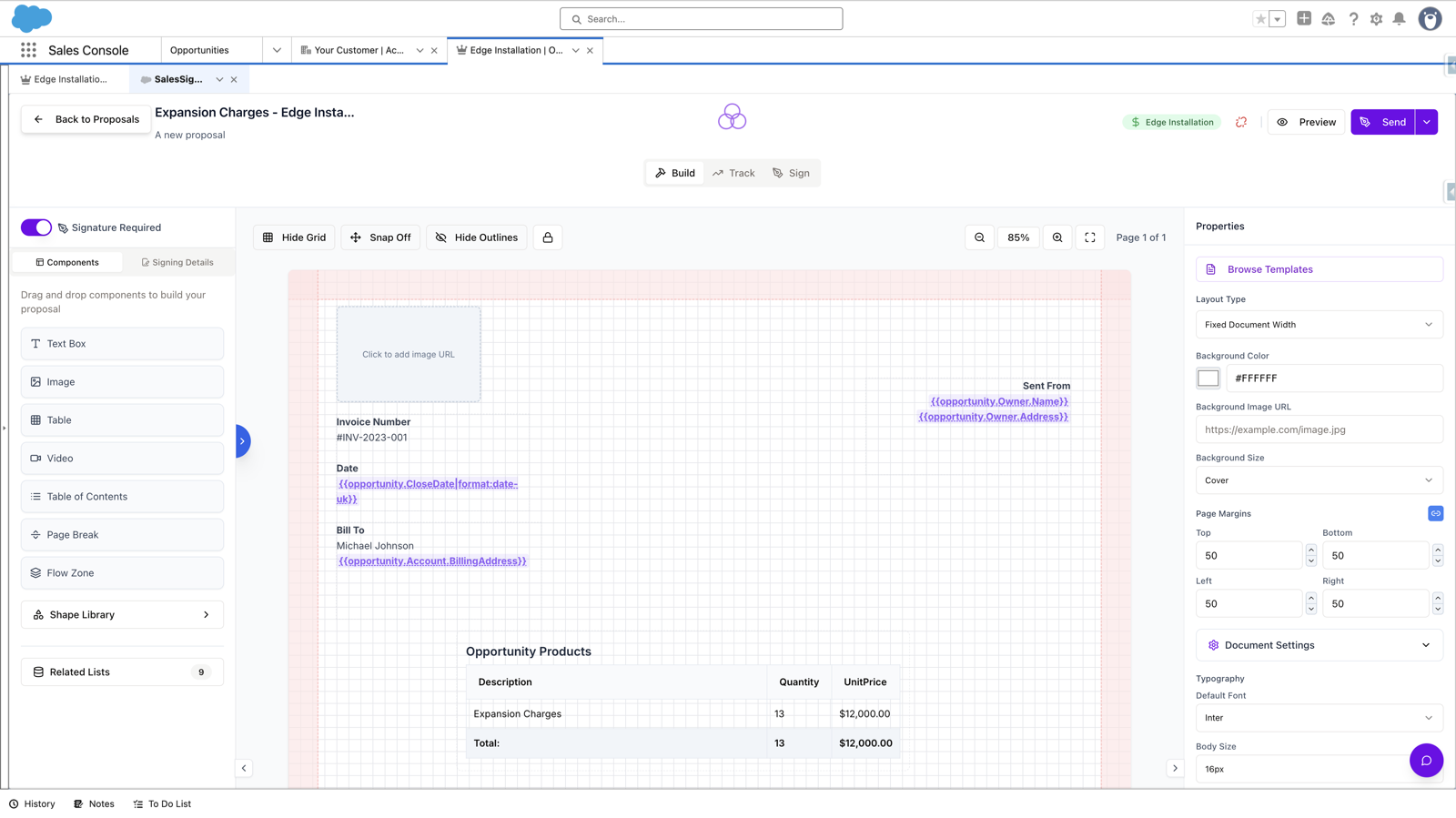
SalesSign runs as a native Salesforce experience powered by Canvas, Lightning Web Components and real-time bidirectional sync. Your reps build, send, track and sign — without ever leaving the CRM.
Bolted-on tools cost you deals. Native ones close them.
The difference between a tool that connects to Salesforce and one that lives in Salesforce shows up the moment your reps start selling.
Bolted-on document tools
- Reps tab-switch between four tools to send one proposal
- Brittle middleware drops signatures and stage updates
- Separate logins, licenses and admin pain for IT
- Data drifts between CRM and "the doc tool"
- Hours spent debugging sync errors and webhooks
- Buyers see a different brand mid-flow
SalesSign — true native
- One workflow, one screen, zero context-switching
- Real-time bidirectional sync — never miss an update
- SSO via Salesforce. No new accounts to manage
- Single source of truth. CRM is always current
- Nothing to maintain. Updates roll out automatically
- Branded, embedded experience end-to-end
Connected to your Salesforce in minutes — not months.
No consultancy retainer. No three-month implementation. Connect SalesSign to your org, assign permissions and your reps start sending today.
Connect your Salesforce org
Authorise SalesSign with a single OAuth handshake. We auto-detect your objects, fields and page layouts.
Assign permissions
Give the right reps access via permission sets. Bulk-assign in seconds — no profile cloning or sharing rule rewrites.
Start sending proposals
Open any opportunity, build a proposal with live merge fields, and send it for signature — without ever leaving the record.
From connecting your org to sending your first SalesSign proposal — no IT ticket, no Apex, no waiting on a developer.
Everything sales needs, where they already work.
Lightning Web Components and Canvas surfaces drop straight onto the records your team uses today — Opportunity, Account, Quote or any custom object you've built.
Embedded Proposal Builder
The full SalesSign builder, embedded on Opportunity, Quote or any object. Build, edit and preview without ever switching tabs.
Live Signature Status
See exactly where every envelope stands — sent, viewed, signed — directly from the record. No more refreshing your inbox.
Buyer Engagement
Open rates, time-on-page and session replay — pinned to the opportunity. Know who's hot before you pick up the phone.
Quick Actions
One-click actions for "New Proposal", "Send for Signature" and "Clone Template". Add to any layout or the Lightning utility bar.
Flow Actions & Triggers
Drop SalesSign actions into Salesforce Flows. Auto-send proposals on stage change. Trigger signature requests from approval processes.
SSO & Permission Sets
Single sign-on through Salesforce. Access controlled by permission sets you already manage — no new identity store to maintain.
Your CRM is the source of truth. Always.
Every proposal, every signature, every status change writes back to Salesforce in real time. No batch jobs. No nightly syncs. No "let me refresh" moments.
- Proposal data writes directly to standard and custom objects
- Signature events trigger instant record and stage updates
- Signed PDFs auto-attach to the right opportunity
- Live merge fields read straight from your data model
- Audit trails sync as Salesforce records, not external links
See it running inside Salesforce.
The fastest way to understand "native" is to watch it work — on a real org structure, real objects, a proper sales flow. 20 minutes, no slideware.
Book Your Live Demo →Document generation for Salesforce — a full-featured app — embedded inside your CRM.
SalesSign uses Salesforce Canvas to deliver a rich, modern, fully-featured experience right inside the Lightning record page. Reps stay in flow. Admins stay in control.
Single Sign-On
Authenticated automatically via your Salesforce identity
Context Aware
Knows the current record, user and permissions
Mobile Ready
Works seamlessly inside the Salesforce Mobile app
Always Current
Updates roll out automatically — nothing to upgrade
See SalesSign working inside Salesforce in 20 minutes.
Book a live demo and we'll walk you through SalesSign on a use case that matches how your team sells today. Native, embedded,
end-to-end.