← All alternatives
SalesSign vs DocuSign · 2026 comparison

The DocuSign alternative built for Salesforce teams

DocuSign is the eSignature standard, and its Salesforce app is mature. But it signs documents you have already built somewhere else, the Salesforce app is licensed on top of an eSignature plan, and envelopes are rationed per user per year. SalesSign puts the proposal builder, eSignatures, engagement analytics and a native Salesforce integration in every plan, from £19 per user per month.

Proposal builder included Salesforce included on every plan Monthly envelopes, not yearly caps 14-day free trial
SalesSign
VS
DocuSign

The signing standard. No proposal builder, a Salesforce app sold on top, and 100 envelopes per user per year.

The short answer

Which one should a Salesforce team choose?

Choose SalesSign if your reps build proposals, quotes or contracts from Salesforce data and you want the document, the signature and the engagement data on the Opportunity in one product. Every plan includes the builder, eSignatures, analytics and the Salesforce integration, with envelopes included monthly.

Stay with DocuSign if signing is the whole job, your documents come finished from legal or another system, and you need DocuSign’s breadth: notarisation, identity verification, CLM, and a compliance footprint that procurement teams already recognise. Those are real strengths, and SalesSign does not try to match them.

Why customers switch

Why Salesforce teams choose SalesSign over DocuSign.

Build the document, not just sign it

DocuSign expects a finished file. Generating one from Salesforce data means DocuSign Gen, a separate subscription, or another tool. SalesSign’s drag-and-drop builder creates the proposal from the Opportunity, with pricing tables, merge fields and locked sections, then signs it in the same flow.

Salesforce is included, not licensed on top

DocuSign eSignature for Salesforce is listed on the AppExchange from $30 per user per month on top of an eSignature plan, and DocuSign’s pricing page places Salesforce document generation on its sales-quoted Enhanced plans. SalesSign’s native integration is in every plan. See how the DocuSign integration works.

Monthly envelopes and real engagement data

DocuSign’s Standard and Business Pro plans include up to 100 envelopes per user per year, and status is what you get back. SalesSign Pro includes 20 envelopes per user every month, Max includes 50, and every plan records page-level time, per-recipient engagement and session replay on the Salesforce record.

Feature by feature

SalesSign vs DocuSign: side by side.

Where each feature sits in the two products, including which DocuSign plan you need to get it.

Feature
SalesSign
DocuSign eSignature
Drag-and-drop proposal and document builder
Every plan; document, deck and responsive web modes
Not included; DocuSign Gen sold separately
eSignatures with sequential and parallel routing
Every plan
Every plan
Signing volume
20 (Pro) or 50 (Max) envelopes per user each month; pay as you go on Builder
Up to 100 envelopes per user per year on Standard and Business Pro; overage fees
Templates
Unlimited, version-controlled, shared by the account
Envelope templates; documents built elsewhere
Salesforce integration
Native and included on every plan; builder opens inside Salesforce
AppExchange app from $30 per user per month on top of a plan; Salesforce generation on Enhanced plans
Merge fields
Any object, lookups five levels deep, related lists, formatting kept
From the record; formatting flattened to text
Write-back to Salesforce
Status, signed PDF, engagement and custom fields in real time; Flow actions
Status via Connect, completed PDF, merge-field writeback
Engagement analytics
Page-level time, per-recipient engagement, session replay, every plan
Envelope and recipient status
Collect payment at signature
Stripe Sign & Pay on the Max plan
Business Pro and Enhanced
Bulk send
Salesforce Flow actions to generate and send at scale
Business Pro and Enhanced
Single sign-on
Sign in with Salesforce, every plan
Enhanced plans
Notary, ID verification, CLM
Not offered
Available as add-ons and separate products
Pricing
£19, £29 or £49 per user per month, billed monthly
Standard £20 and Business Pro £33 per user per month on annual billing (US $25 and $40; $45 and $65 monthly); Enhanced on quote
Try before you buy
14-day trial with 5 signing envelopes
30-day trial and a free account for signing

DocuSign plan details taken from docusign.com’s UK and US pricing pages and the AppExchange listing on 10 September 2026. DocuSign prices are shown in the currency of each page; SalesSign in pounds sterling. Always check the latest with the vendor.

Pricing compared

What a Salesforce team actually pays.

Take a ten-person sales team that builds proposals from Salesforce and needs them signed. Here is what the list prices add up to over a year.

DocuSign

Business Pro + Salesforce app

$40 per user / month, paid annually
  • eSignature for Salesforce app listed from $30 per user per month on top
  • 100 envelopes per user per year; overages billed per envelope
  • Document generation needs DocuSign Gen, sold separately
  • SSO needs an Enhanced plan
Ten users, one year$8,400 before Gen and overages
SalesSign

Pro

£29 per user / month, billed monthly
  • Proposal builder, eSignatures, analytics and Salesforce included
  • 20 signing envelopes per user each month, top up as you go
  • AI Studio builder assistant
  • No annual contract
Ten users, one year£3,480, nothing extra for Salesforce
SalesSign

Max

£49 per user / month, billed monthly
  • Everything in Pro
  • 50 signing envelopes per user each month
  • Stripe payments at acceptance
  • Forms mapped to Salesforce fields
Ten users, one year£5,880, all features included
The DocuSign total uses the US list prices because the Salesforce app is priced in dollars on the AppExchange; the UK equivalents are £33 per user per month for Business Pro. Independent implementation guides estimate $70 to $90 per user per month once a base plan, the Salesforce app and Gen are combined. Our post on the hidden cost of bolt-on eSignature in Salesforce shows how to work out your own number.
How SalesSign compares

A closer look at the DocuSign alternative for Salesforce.

Built for proposals

A proposal builder DocuSign never had

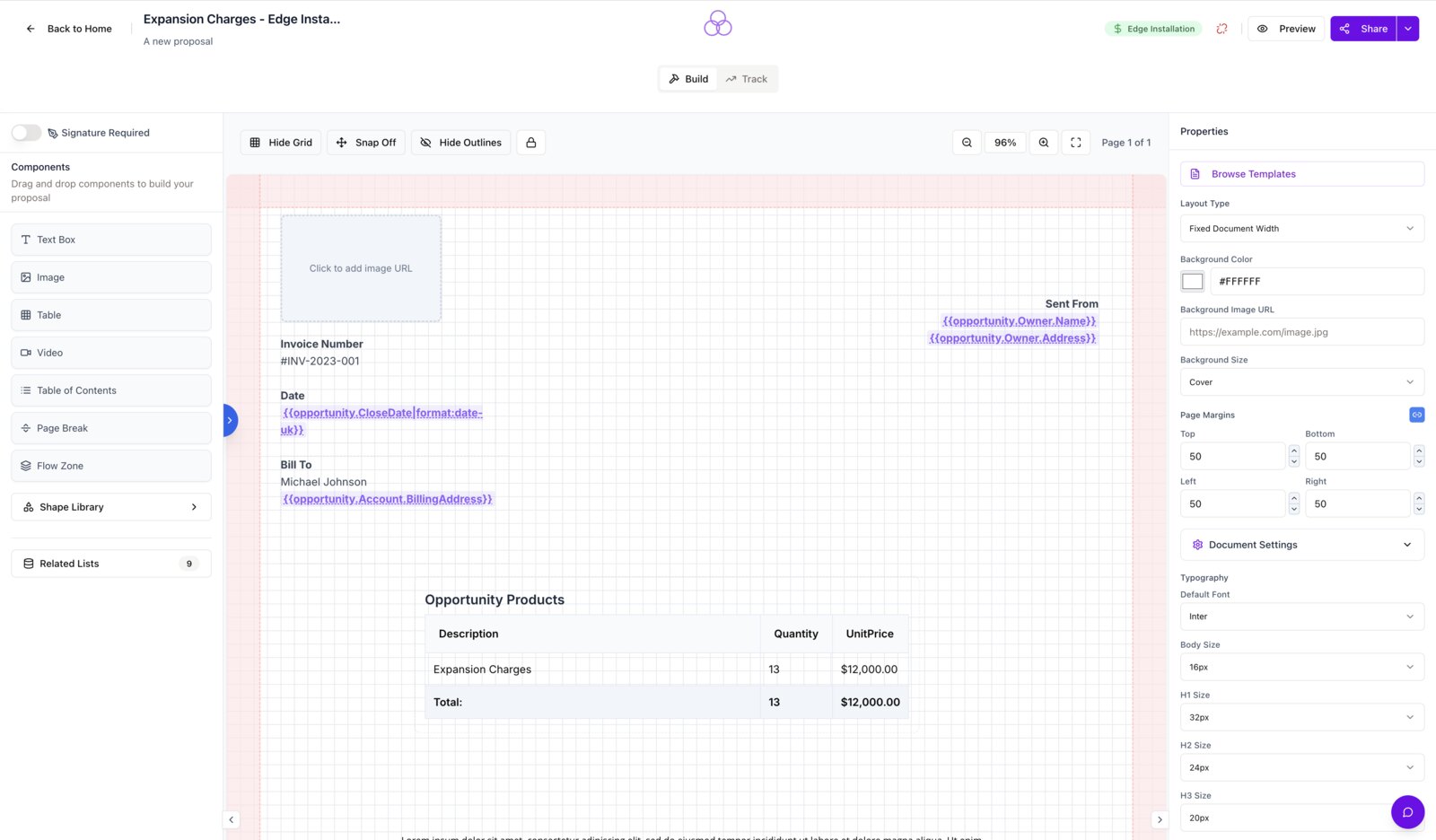
Reps assemble cover pages, pricing tables, case studies and terms from reusable blocks, with Opportunity Products or CPQ lines flowing into the pricing table and merge fields keeping their currency and date formatting. Then they collect the signature on the same document, without exporting a PDF and uploading it to a second tool.

Salesforce merge fields and quote lines being placed in the SalesSign proposal builder
Inside Salesforce

Live inside the Opportunity record

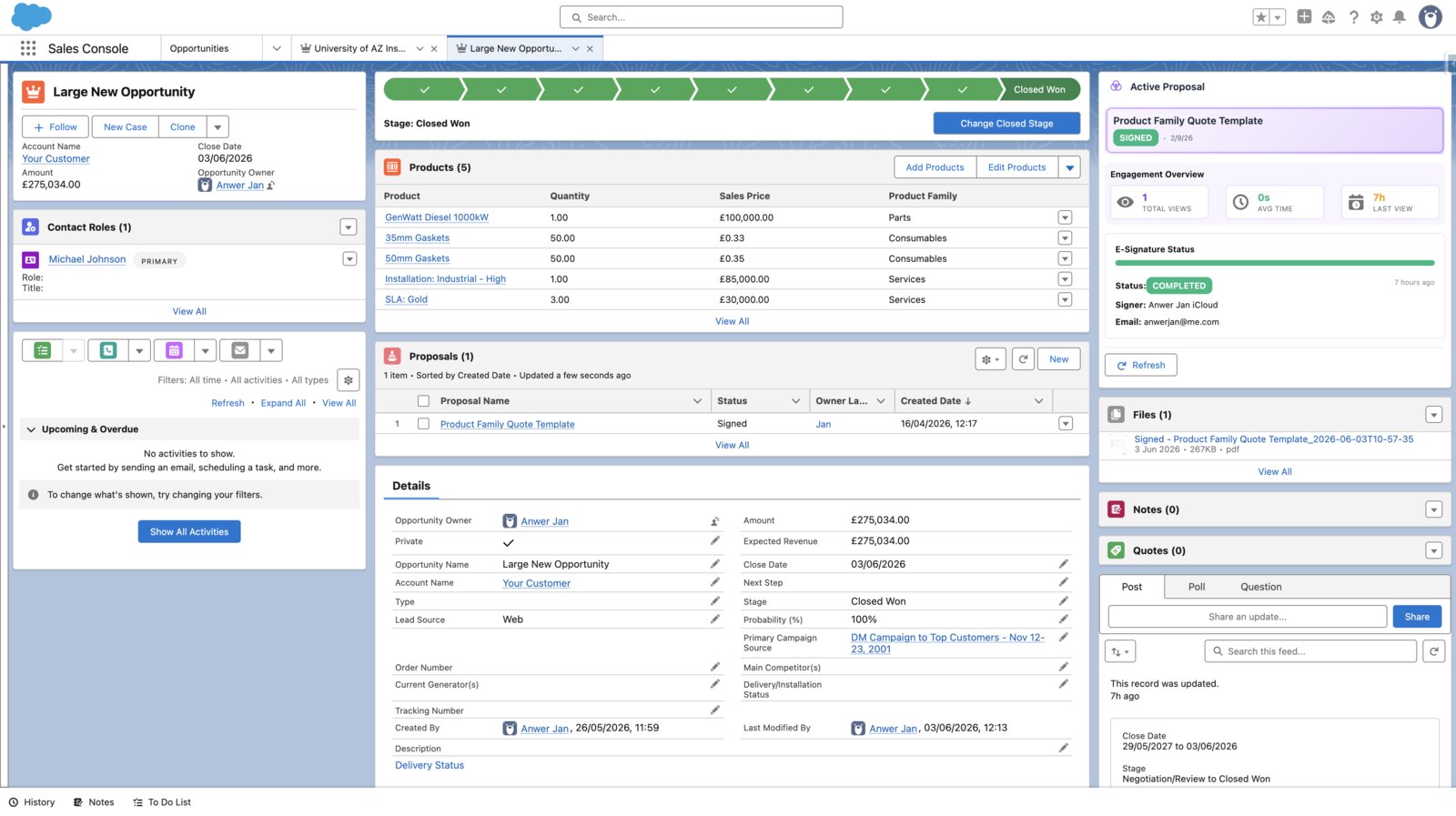
SalesSign runs through Salesforce Canvas and Lightning Web Components, so the builder opens on the record. DocuSign’s Send with DocuSign button starts on the record but hands the rep to DocuSign’s tagger to place fields. With SalesSign nothing leaves the page, and signed PDFs, status and engagement land back on the record as they happen.

SalesSign proposal builder open inside the Salesforce console on an Opportunity record
Engagement

See what happens after you hit send

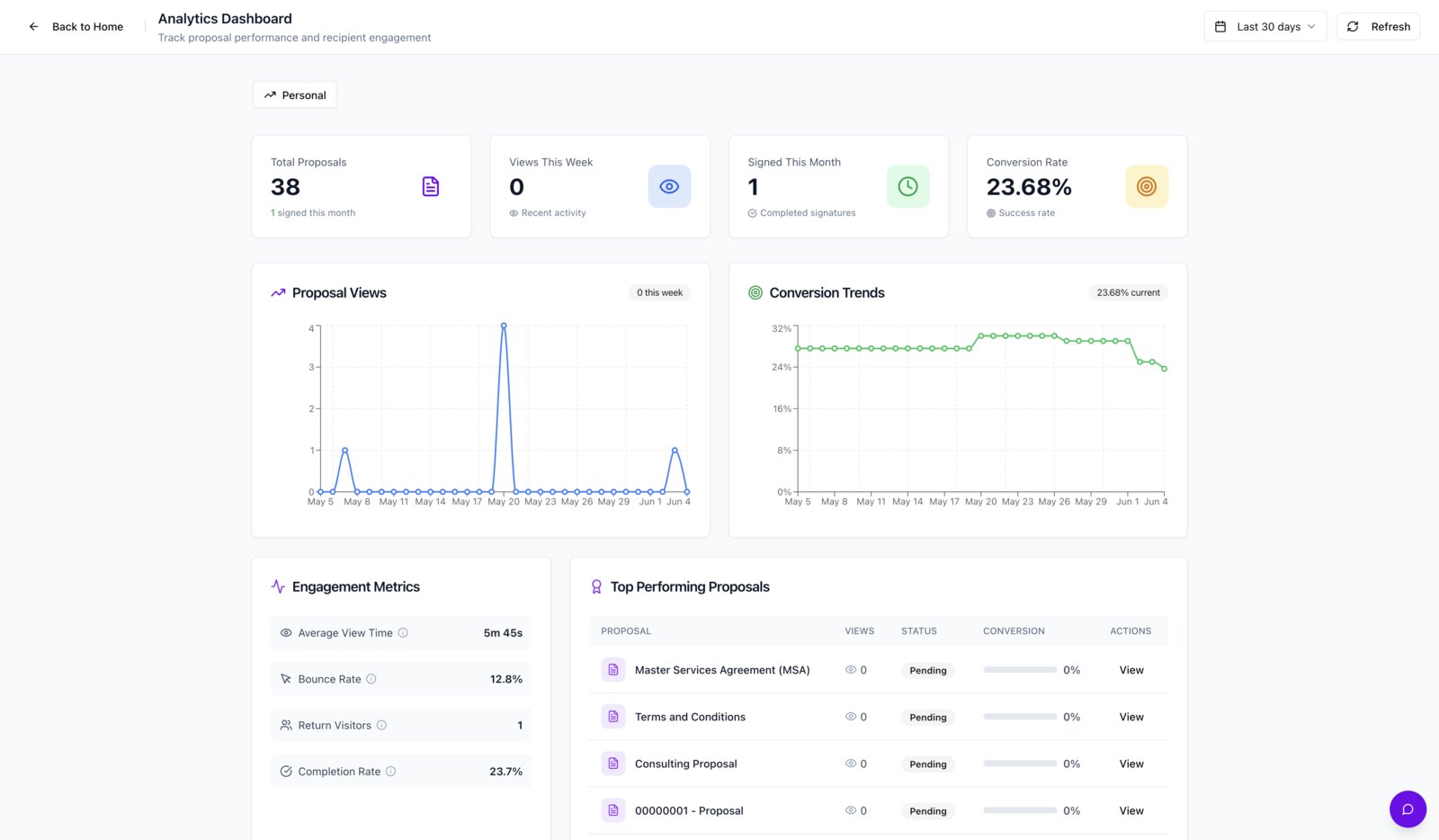
DocuSign tells you an envelope was viewed and signed. SalesSign tells you who read which page, for how long, and where they stopped, then writes it to the Salesforce record so reps know which deals to push. It is included on every plan, not a separate analytics product.

SalesSign engagement analytics showing per-recipient page views and time spent
Switching

How to move from DocuSign to SalesSign in six steps.

Most teams keep DocuSign for in-flight envelopes, send everything new from SalesSign for one sales cycle, then switch off at renewal.

Check your DocuSign renewal and envelope position

Plans are annual. Note the renewal date and how many envelopes each user has left, so the switch lands before you pay for another year or hit overage fees.

Audit what you actually send

List the envelope templates used in the last 90 days and the Salesforce fields they merge. Separate proposals and quotes you build from fixed contracts you only sign.

Rebuild proposals in the builder, overlay the contracts

Proposals and quotes rebuild natively with pricing tables, merge fields and locked sections. Contracts that cannot change are uploaded as PDFs with signature fields placed visually, no tagging.

Connect Salesforce

Install the SalesSign package, authorise the connection and map merge fields to the Opportunity, Account, Contact, Quote and custom objects. Users sign in with Salesforce, so there are no accounts to provision.

Run a pilot for one sales cycle

Start with the 14-day free trial and its five envelopes, then move a pilot team onto Pro or Max. Keep DocuSign for envelopes already out for signature.

Archive DocuSign and switch off

Completed DocuSign envelopes sent from Salesforce are already on the record. Download any others from DocuSign, attach them to the relevant records, and cancel before renewal.

Onboarding help is included on every SalesSign plan. If you would like us to rebuild your top templates with you, mention it when you book a demo.
Other comparisons

Comparing DocuSign with PandaDoc, Adobe Sign or Dropbox Sign?

If DocuSign is on your shortlist, these usually are too. The Salesforce questions are the same for each. For the full field, see our guide to the best PandaDoc alternatives for Salesforce teams.

DocuSign vs PandaDoc

PandaDoc adds the proposal builder DocuSign lacks, but its Salesforce integration is a paid add-on on annual Business and Enterprise plans and editing happens in PandaDoc’s app. See how SalesSign compares with PandaDoc.

DocuSign vs Adobe Acrobat Sign

Acrobat Sign is the closest like-for-like: enterprise eSignature with a Salesforce connector licensed separately and a yearly transaction allowance. See how SalesSign compares with Adobe Sign.

DocuSign vs Dropbox Sign

Dropbox Sign is simpler and cheaper for pure signing, with a Salesforce integration from its Standard plan, but templates must be built in Salesforce and there is no proposal builder. See how SalesSign compares with Dropbox Sign.

Customer Story
“We onboard a surprising number of new patients through formal referral and consent documentation, and SalesSign has genuinely streamlined that process. I can send a branded document, get it signed electronically, and have the whole thing timestamped and audit-trailed before the patient even leaves the building. The compliance piece was non-negotiable for us and it holds up.”
Rossol Hamid
Consultant Clinician, NHS
FAQ

DocuSign alternative questions, answered.

Is SalesSign a good DocuSign alternative for Salesforce?

Yes, for sales teams that build proposals, quotes and contracts from Salesforce data. SalesSign covers eSignatures with sequential and parallel routing and a full audit trail, and adds the proposal builder, engagement analytics and a native Salesforce integration that DocuSign either lacks or licenses separately. Teams that only need to sign finished documents, or that rely on notarisation, ID verification or CLM, are better served by DocuSign.

How does SalesSign pricing compare to DocuSign?

SalesSign is £19, £29 or £49 per user per month, billed monthly, with the builder, eSignatures, analytics and Salesforce included. DocuSign’s Standard and Business Pro are £20 and £33 per user per month on annual billing in the UK ($25 and $40 in the US), the Salesforce app is listed from $30 per user per month on top, and document generation needs DocuSign Gen. For a ten-user Salesforce team, DocuSign Business Pro plus the Salesforce app is about $8,400 a year before Gen; SalesSign Pro is £3,480.

Are SalesSign signatures legally binding like DocuSign’s?

Yes. SalesSign produces a tamper-evident audit trail with signer identity, IP address and timestamps, and a signed PDF that meets the requirements of eIDAS in the UK and EU and ESIGN and UETA in the US, the same standards DocuSign relies on. The audit trail is stored on the Salesforce record alongside the signed document.

Does SalesSign integrate with Salesforce as deeply as DocuSign?

More deeply for a sales team. DocuSign’s app starts on the record and hands off to DocuSign’s tagger; SalesSign’s builder runs inside Salesforce through Canvas and Lightning Web Components, merge fields follow lookups five levels deep with formatting kept, and status, signed PDFs and engagement write back in real time. Our DocuSign Salesforce integration guide covers the mechanics and limits of DocuSign’s app.

Can we migrate our DocuSign templates?

There is no direct import. Proposals and quotes are rebuilt in SalesSign’s builder, which most teams do for their top templates in a few hours. Fixed contracts are uploaded as PDFs with signature fields placed visually. Onboarding help is included on every plan.

What happens when we hit our envelope limit?

You will not hit a yearly cap. SalesSign Pro includes 20 signing envelopes per user each month and Max includes 50, with pay-as-you-go top-ups from inside the app. DocuSign’s Standard and Business Pro plans include up to 100 envelopes per user per year and charge overages per envelope.

Does SalesSign collect payments at signature?

Yes, on the Max plan. Sign & Pay connects your Stripe account so a customer can pay a deposit or the full amount when they accept, and the payment is recorded against the proposal and its Salesforce record. DocuSign offers payment collection on Business Pro and Enhanced plans.

What about security and compliance?

The SalesSign application runs on Railway, with its database, document storage, PDF generation and email on AWS, all in UK/EU regions. Your CRM data stays in your own Salesforce org. Everything is encrypted at rest and in transit, and users sign in with Salesforce so your existing SSO, MFA and passkey policies apply.

Ready When You Are

Ready to switch from DocuSign?

Book a 20-minute live demo on a use case that matches how your team sells today, or start a 14-day trial and send a real proposal from Salesforce.